




trying to upgrade Trisquel 11 to 12 via terminal: no valid mirror found

Am trying to upgrade Trisquel 11 to 12. In the terminal, already did commands recommended in previous posts on this forum, without problem.
The sudo do-release-upgrade, however, gives
"No valid mirror found
while scanning your repository information no mirror entry for the upgrade was found. This can happen if you run an internal mirror or if the mirror information is out of date.
Do you want to rewrite your 'sources.list' file anyway? If you choose 'Yes' here it will update all 'aramo' to 'ecne' entries. If you select 'No' the upgrade will cancel."
How do I get the terminal to download from a valid mirror in my country? When I made a bootable USB with Trisquel 12 before to install on a different laptop, chose that mirror, and it downloaded fine. But I didn't want to use this USB to install Trisquel 12 on the laptop that already has Trisquel 11 on it, just do the release upgrade. Please let me know whether/how this can be done, whether I should let it rewrite the 'sources.list' file which would update all 'aramo' to 'ecne' entries, or whether I'd be better off doing a fresh install of Trisquel 12 with the bootable USB I already have.
Thanks in advance for answers, I appreciate it!

There is a program provided with Trisquel 11 called software-properties-gtk. In Triskel, the KDE version, I have software-properties-qt. There I can choose which server I want to download from. You do not need to choose a server with in your country.
> whether I should let it rewrite the 'sources.list' file which would update all 'aramo' to 'ecne' entries,
After you change your server to something that works, you can let do-release-upgrade update the sources, which will be temporary if the process fails.
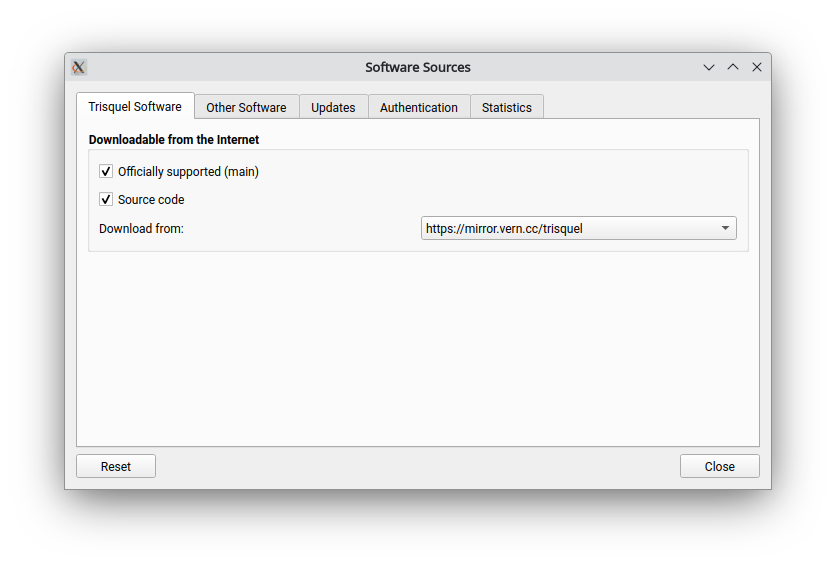
Thank you for this reply, @eric23 ! How do I get to/where to I find software-properties-gtk to choose a server to download from?

System > Control Center > Software & Updates
Thank you @icarolongo and @eric23 Made the change where you suggested, the upgrade download and installation then went very smooth, until after the restart at the end, where now the ThinkPad Setup screen appears, instead of Trisquel 12. So I'll have to figure out how to get Trisquel 12 to boot again. (sigh)
During the upgrade at one point wifi asked for authentication, which I did because the wifi icon was blinking. The only two red lines were something to do with that it couldn't find remote desktop.
If anyone can give advice how to get Trisquel 12 to boot again on this T480, please let me know. Thank you!
Trisquel appears in the Boot menu, ahead of the attached USB with Trisquel 12 on it, but when pressing the hightlighted 'trisquel' there's a black screen briefly with a few lines, then it goes to the ThinkPad Setup screen. Will try to deal with it tomorrow. Will report if/when I get it back to boot normally.